
From Your AI Assistant: Plan Golf in Japan Just by Chatting
Find courses, join rounds and request tee times in Japan just by chatting with your AI assistant. Setup starts with one copy-paste message. Here's how.
PGT Team · 15 Nov 2026 · 6 min read

Imagine planning a golf day in Japan the way you'd ask a friend for advice: "Find me a course near Tokyo I can reach by train, with a view of Mt. Fuji." A few seconds later you have real options, and with one more message a tee time request is on its way.
That's Play Golf Tokyo, from your AI assistant. You don't need to be technical to use it, and setting it up starts with a single copy-paste message. Here's everything you need to know.
Quick Navigation
- Key Takeaways
- Why This Matters in 2026
- How It Works, in Plain Words
- How to Set It Up
- What You Can Do With It
- Things to Ask Your Assistant
- Good to Know Before You Book
- Best Practices
- Quick Start Checklist
- Frequently Asked Questions
- Conclusion
Key Takeaways
- Play Golf Tokyo works inside your AI assistant. Once it's set up, your assistant can use our live course and booking information.
- Setup starts with one message. Copy and paste a single sentence to your assistant, then follow its instructions to finish.
- You just chat. No forms, no menus. Ask in your own words and the assistant does the searching.
- It's free. You only pay for the rounds you book, the same as on our website.
- Real people still handle your booking. Tee time requests go to our team, who check with the club and confirm by email.
Why This Matters in 2026
More and more travellers now plan their trips by asking an AI assistant. It's quick, it's conversational, and it can juggle dates, budgets and preferences in one go. The catch is that a general assistant doesn't know which courses actually welcome visitors, how to get there, or whether a tee time is possible. It can only guess.
Connecting Play Golf Tokyo changes that. Your assistant stops guessing and starts working from our course catalogue, our community rounds and our booking system. You get the convenience of chat with information you can actually rely on.
How It Works, in Plain Words
Your AI assistant is smart, but on its own it can't look inside other services. Connecting Play Golf Tokyo is like adding an app to your phone: once it's installed, your assistant can do something new.
In this case, it gains a new set of golf skills: searching our courses, finding open rounds, sending tee time requests and checking your bookings. You don't need to learn any commands. You ask normally, and the assistant works out what to do.
How to Set It Up
Step 1. Copy this sentence and paste it to your AI assistant:
Set up PGT for me. Fetch https://www.play-golf-tokyo.com/get-started.md and follow it.
Step 2. Follow your assistant's instructions to finish. It reads our setup guide and walks you through the last few steps for your app, such as adding Play Golf Tokyo in its settings or approving the connection.
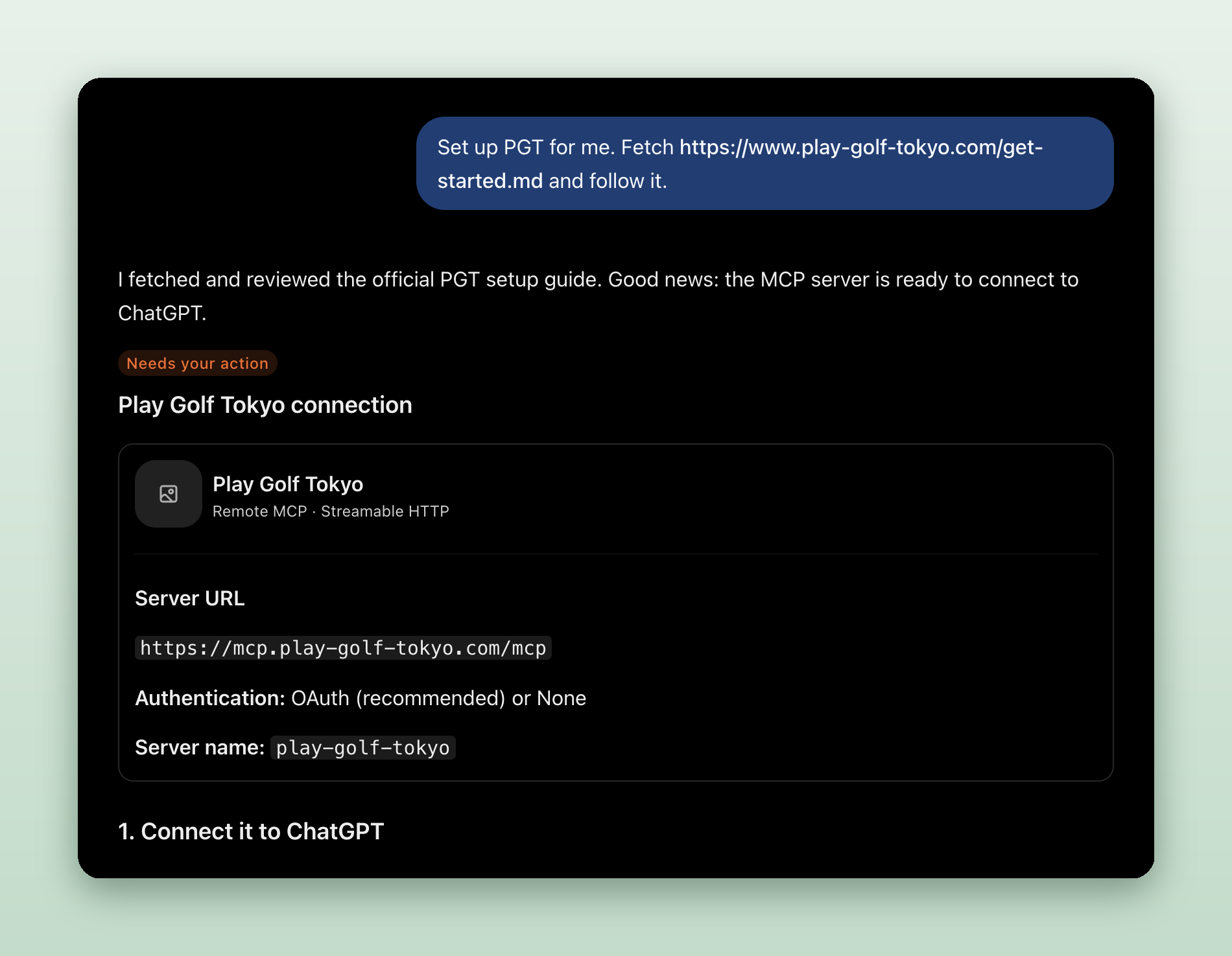
ChatGPT reads the guide, then shows you how to finish the connection in your settings.
Step 3. Your assistant checks that everything works. Once it says you're connected, you're ready to go.
The first time you ask for something that needs your account, like your bookings, your assistant will ask you to sign in to Play Golf Tokyo. You approve the connection yourself and can disconnect at any time. Without an account, the assistant simply asks for your name, email and phone number when you send a tee time request.
Want more detail? Visit our From Your AI Assistant page.
What You Can Do With It
- Find courses by name, area or style, with access details and highlights.
- Browse course tags such as "near Tokyo", "train accessible" or "Mt. Fuji view" to narrow things down.
- Request a tee time with your dates, number of players and how you'll get there. Our team contacts the club and emails you the answer.
- Join a community round by finding open groups filtered by date, region, level and group size. It's a great option if you're travelling solo or as a pair.
- Check your bookings, including requests, confirmed tee times, rounds you've joined and any deposit still to pay.
- Save courses you like and pull them up later, in chat or on our website.
- Keep your golf profile (level, handicap, preferences) so your requests are filled in automatically.
Some of these, like joining rounds, seeing your bookings and saving courses, need you to sign in once with a free Play Golf Tokyo account. Everything else works without one.
Things to Ask Your Assistant
Not sure where to start? Copy any of these into your assistant once it's set up:
- "Find courses near Tokyo reachable by train with a Mt. Fuji view."
- "Which courses near Narita Airport could I play the morning before my flight?"
- "Compare three Pro Tour venues within 90 minutes of Shinjuku."
- "Request a tee time for two at Narita Hills on a weekday next month, morning start."
- "Find a community round near Tokyo I could join next weekend."
- "Show my upcoming bookings and any deposit I still need to pay."
You can follow up naturally, too: "Which of those is cheapest?", "What about the weekend instead?", or "Book the second one."
Good to Know Before You Book
- Check community rounds first. These tee times are already booked with the club, so joining one is the fastest way to play.
- Hosts approve every player. When you ask to join a round, the host gets your message and accepts each golfer.
- Some rounds ask for a deposit. It's refunded after the round. You'll get a link to pay it once the host accepts you.
- Green fees are paid at the club on the day.
- Expect a half-break round. Many Japanese courses play 9 holes, stop for lunch, then play the last 9.
- All times are Japan time (JST). Keep that in mind if you're planning from abroad.
Best Practices
- Give details. Dates, number of players, your level and where you're staying help the assistant find better matches.
- Offer a few dates. Two or three possible days give our team a much better chance of securing a tee time.
- Sign in if you'll use it often. Your details and preferences are filled in automatically, so requests take seconds.
Common Risks and How to Avoid Them
- Stopping before setup is finished
Your assistant can't reach Play Golf Tokyo yet.
Avoid it: follow every step your assistant gives you, until it confirms you're connected. - The assistant doesn't use Play Golf Tokyo
You get generic answers instead of our live courses.
Avoid it: mention "Play Golf Tokyo" in your question, or paste the setup message again. - Treating a request as a confirmation
Showing up for a tee time the club hasn't confirmed.
Avoid it: wait for our confirmation email before making plans around the round. - Vague requests
A long back-and-forth before you get useful options.
Avoid it: include dates, group size and preferred area in your first message.
Quick Start Checklist
- Paste the setup message to your AI assistant.
- Follow its instructions to finish the setup.
- Ask for courses that match your trip.
- Join a community round, or send a tee time request.
- Watch your inbox for our confirmation email.
Frequently Asked Questions
- Q: Do I need to be technical to use this?
A: Not at all. Paste one message, follow your assistant's quick steps to finish, then chat as you normally would. - Q: Does it cost anything?
A: Setup is free. You only pay for the rounds you book, at the same prices as on our website. - Q: Is a tee time request an instant booking?
A: No. Your request goes to the Play Golf Tokyo team, who check with the club and confirm by email. Joining a community round works differently: the tee time is already booked, and the host approves each player. - Q: Do I need a Play Golf Tokyo account?
A: Not to search courses, browse community rounds or request a tee time. You'll need a free account to join rounds, see your bookings, save courses or keep a profile. - Q: Which AI assistants does it work with?
A: Claude, ChatGPT, Gemini, Perplexity, Copilot, Le Chat and other apps that support connectors, plus AI coding tools like Claude Code, Codex CLI, Gemini CLI, Cursor, VS Code and Windsurf. - Q: Is my data safe?
A: You approve the connection yourself and can disconnect at any time. If you're not signed in, the assistant only shares the name, email and phone number you give it with our team. See our privacy policy for details.
Conclusion
Planning golf in Japan should be as easy as asking a question. Paste one message to your AI assistant, follow its steps to finish, then ask in your own words and leave the club side to us. If you'd rather do it the classic way, you can always request a tee time on our website.


